
Many boaters want to see important engine data directly on the fish finder screen: RPM, temperatures, voltage, fuel consumption, and fault codes. Honda outboard engines support NMEA 2000 data transmission, but it requires the correct cables and building a small network.
1. What Do You Need?
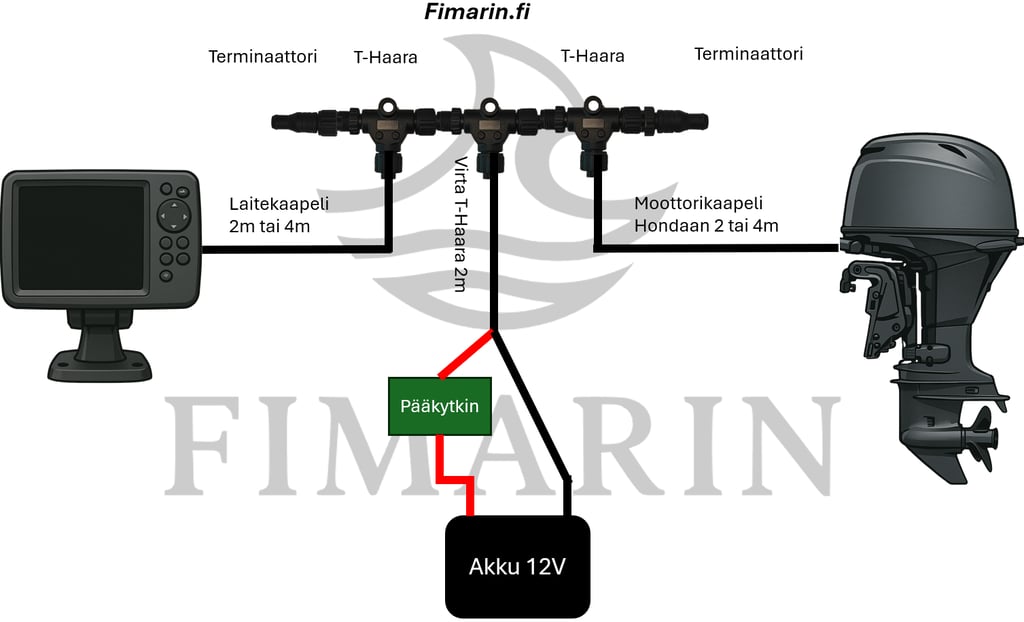
- Honda compatible engine cable
- NMEA 2000 backbone cable
- T-connectors (2 pcs)
- Terminators (2 pcs)
- Power cable for the NMEA 2000 network
- Fish finder/display
Valmiit sarjat: 4 metrin sarja tai 2 metrin sarja.
2. Building the NMEA 2000 Network
- Connect the power cable to the battery via the main switch (main switch off).
- Connect the T-connectors to both sides of the power cable.
- Connect the cable from the engine to one T-connector, and the cable going to the fish finder to the other.
- Attach terminators to both ends of the T-connector row.
3. Connecting the Honda Outboard Engine
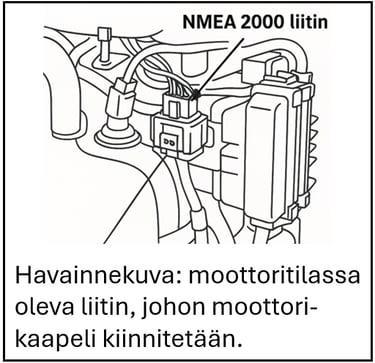
- Open the engine cover and locate the NMEA connector in the engine compartment.
- Route the cable from the engine through the same grommet as the control cables.
- Start the chartplotter/fish finder and turn on power to the engine.
- Check the NMEA 2000 settings in the chartplotter/fish finder menu.
- Add engine data to your desired views.
Compatible Honda Engines
- BF40D (serial no. BBDJ-1000001→), BF50D (BBEJ-1000001→), BF60A (BBFJ-1000050→)
- BF75DK3 (BBAJ-1200001→), BF90DK4 (BBCJ-1300001→), BF100A (BBMS-1000001→)
- BF115D (BBHJ-1000001→), BF135A (BARJ-1301771→), BF150A (BANJ-1304171→)
- BF200AK1 (BAEJ-1600002→), BF225AK1 (BAGJ-1600012→), BF250A (BBJJ-1000001→)
- BF200D–250D – all, BF350A – all

Leave a Reply