


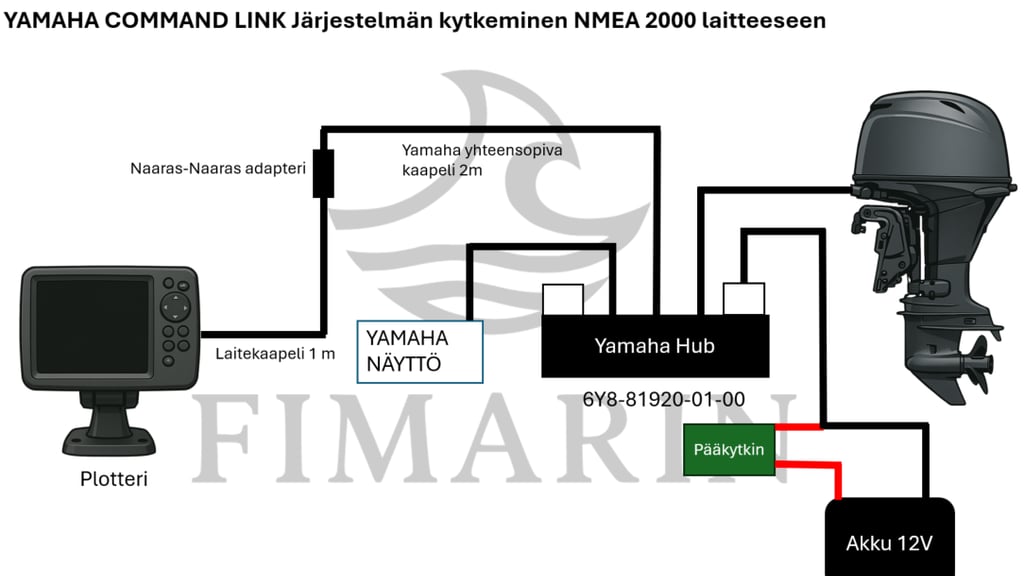
Do you have a Yamaha instrument panel and Yamaha Command Link Hub, but would like to see engine data on your fish finder as well?
Jos sinulla on Yamaha Command Link (ei Command Link Plus!) yhteensopiva Yamaha perämoottori sekä mittaristo asennettuna Command Link Hubin kautta, niin näillä ohjeilla saadaan rakennettua kustannustehokkaasti yhteys moottorin ja plotterin väliin.
Tämän ohjeen asentamistapa mahdollistaa moottoridatan tuomisen plotterille ilman erillistä NMEA2000‑runkoverkkoa. Ratkaisu toimii siten, että Yamahan omaa verkkoa jatketaan suoraan Yamaha hubin vapaasta portista ”Yamaha moottorikaapelilla”, ja liitetään plotteri Micro‑C‑liittimellä samaan väylään.
Installation Principle
Yamaha Command Link uses the same bus technology as NMEA 2000. The bus can be extended from the Yamaha terminator using a Yamaha engine cable. The cable acts as an adapter cable between Command Link and the NMEA 2000 network.
Required Equipment
- Yamaha Command Link compatible cable (2 m)
- Female-to-female adapter
- Device cable (1 m)
Kaikki tarvittava on koottu yhteen pakettiin: https://www.fimarin.fi/yamaha-command-link-kytkentapaketti
Installation Steps
Vaihe 0 — Kytke sähköt Yamaha hubista pois irroittamalla syöttökaapelin liitin hubista.
- Remove the white cap from the free port on the Yamaha hub.
- Install the Yamaha NMEA 2000 Engine Cable in the free slot.
- Add the NMEA 2000 adapter to the end of the engine cable.
- Add an NMEA 2000 backbone/device cable to the branch.
- Connect the other end of the backbone/device cable to the chartplotter's Micro-C NMEA 2000 port.
- Turn the power back on.
- Turn on the power to the engine and chartplotter. The engine should now appear in the chartplotter's NMEA 2000 settings.
Leave a Reply